
|
Getting your Trinity Audio player ready...
|
UX vs UI: What’s the Difference?
When it comes to designing digital products, two terms that often get thrown around are UX and UI. While they are closely related, they refer to distinct aspects of the design process. In this article, we’ll explore the differences between UX and UI, their importance, and how they work together to create a seamless user experience.
Understanding UX Design
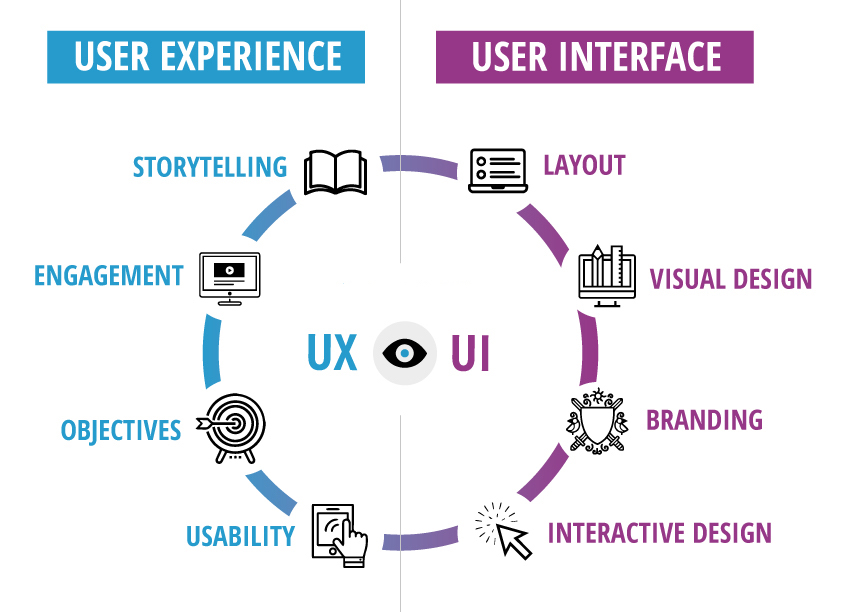
UX, or User Experience design, is all about creating products that provide meaningful and relevant experiences to users. It involves the entire process of acquiring and integrating the product, including aspects of branding, design, usability, and function. UX design is concerned with the user’s journey through the product and ensuring that it is intuitive, efficient, and enjoyable.
Key Elements of UX Design
-
User Research: Understanding the needs, goals, and pain points of the target audience through methods like surveys, interviews, and user testing.
-
Information Architecture: Organizing and structuring content in a logical and intuitive way, making it easy for users to find what they need.
-
Wireframing and Prototyping: Creating low-fidelity and high-fidelity prototypes to test and refine the user flow and interactions before development.
-
Usability Testing: Evaluating the product with real users to identify any usability issues and make improvements based on feedback.
The Role of UI Design
UI, or User Interface design, is the process of designing the visual and interactive elements of a product. It focuses on the look, feel, and interactivity of the product, ensuring that it is aesthetically pleasing, consistent, and responsive. UI design brings the UX design to life by creating the visual hierarchy, typography, color schemes, and interactive elements that users interact with.
Key Elements of UI Design
-
Visual Design: Creating a visually appealing interface using principles of color theory, typography, and graphic design.
-
Interaction Design: Defining how users interact with the interface through animations, transitions, and micro-interactions that provide feedback and enhance usability.
-
Responsive Design: Ensuring that the interface adapts seamlessly to different screen sizes and devices, providing a consistent experience across platforms.
-
Design Systems: Creating a library of reusable components, patterns, and guidelines that ensure consistency and efficiency in the design process.
The Relationship Between UX and UI
While UX and UI are distinct disciplines, they are highly interconnected and work together to create a successful product. UX design lays the foundation by understanding the user’s needs and defining the structure and flow of the product. UI design then takes that foundation and creates the visual and interactive elements that bring the experience to life.
Think of UX design as the blueprint of a house and UI design as the interior design and decoration. Without a solid foundation (UX), the interior design (UI) may look great but won’t function well. On the other hand, without the finishing touches (UI), the blueprint (UX) may be functional but lack the visual appeal and interactivity that engages users.
The Importance of UX and UI
Investing in both UX and UI design is crucial for creating successful digital products. Here’s why:
-
Improved User Satisfaction: By focusing on the user’s needs and creating an intuitive and visually appealing interface, users are more likely to have a positive experience with the product.
-
Increased Engagement: A well-designed interface that is easy to use and visually engaging can keep users coming back and increase their engagement with the product.
-
Reduced Development Costs: By investing in UX and UI design upfront, you can identify and address usability issues early on, reducing the need for costly redesigns later in the development process.
-
Competitive Advantage: In today’s crowded digital landscape, having a product that stands out with a great user experience can give you a competitive edge and help you attract and retain users.
Examples of UX and UI in Action
Let’s take a look at a few examples of how UX and UI work together in real-world products:
-
Airbnb: Airbnb’s UX design focuses on making the process of finding and booking accommodations easy and intuitive. The UI design complements this with a clean, visually appealing interface that showcases high-quality images and provides clear navigation.
-
Spotify: Spotify’s UX design aims to help users discover and enjoy music seamlessly. The UI design enhances this experience with a visually engaging interface that uses color, typography, and animations to create a dynamic and immersive experience.
-
Slack: Slack’s UX design simplifies team communication and collaboration. The UI design reinforces this by providing a clean, organized interface with clear visual hierarchy and intuitive interactions.
Conclusion
UX and UI design are both essential components of creating successful digital products. While UX focuses on the overall user experience, UI brings that experience to life through visual and interactive design. By investing in both disciplines and understanding how they work together, you can create products that not only look great but also provide a seamless, intuitive, and enjoyable experience for your users.